
What we’re detecting
This detection identifies a two-event chain in Microsoft Entra ID that, taken together, indicates a classic pattern of privilege escalation through an OAuth application: first an application receives the `RoleManagement.ReadWrite.Directory` permission — which allows it to modify role assignments in the directory — and then, shortly afterwards, that same application uses the permission to assign an administrative role (Global Administrator, Privileged Role Administrator, User Access Administrator, among others) to a user or principal.
The rule correlates two distinct events in AuditLogs:
– **Permission Grant**: the `Add app role assignment to service principal` operation in the `ApplicationManagement` category, where the `RoleManagement.ReadWrite.Directory` permission is granted to an application
– **Role Assignment**: an `Assign` operation in the `RoleManagement` category, where the application — not a human user — assigns an administrative role
The correlation is done through the `AppServicePrincipalId` — the same application has to appear in both events. Temporal order matters: the permission grant must precede the use of that permission.
In MITRE ATT&CK, the behavior maps primarily to:
– T1098.003 — Account Manipulation: Additional Cloud Roles
– T1078.004 — Valid Accounts: Cloud Accounts
– T1484.002 — Domain or Tenant Policy Modification: Trust Modification
– T1098.001 — Account Manipulation: Additional Cloud Credentials
Unlike detections focused on initial credential compromise, this use case monitors **persistence infrastructure** established through OAuth applications. The attacker has usually already obtained administrative access in an earlier phase of the attack, and is using that access to build a back door that survives the normal IR response.
Why this still matters in 2026
Most modern Identity Security strategies were built assuming that **the human user is the primary vector**. MFA, Conditional Access, Identity Protection, risk-based access — all of it geared toward detecting anomalous behavior by people. The problem is that OAuth applications operate on a different control plane.
When an application receives delegated or application permissions, it authenticates through separate flows:
– It doesn’t go through MFA (apps have no human factor)
– Conditional Access has limited support for application-level enforcement
– Identity Protection focuses on the user’s risk score, not the application’s
– User Behavior Analytics rarely monitors what apps do with their permissions
– Resetting the original admin’s password does not affect the application’s token
In 2026, this gap has become one of the most exploited vectors in post-compromise persistence attacks. Attackers who gain temporary admin access no longer need to hold on to that access directly: they create an application, grant it elevated permissions, and use the app as a durable mechanism for maintaining administrative control.
The combination of `RoleManagement.ReadWrite.Directory` plus a subsequent administrative role assignment is one of the most dangerous sequences, because:
– The permission allows arbitrary new administrators to be created in the tenant
– Apps holding this permission are rarely monitored actively
– Resetting or locking the original admin account does not affect the application
– The attacker can create a “ghost” admin account that looks legitimate in the logs
– Native alerts for Global Admin creation usually don’t distinguish creation by an app from creation by a human
– It operates inside legitimate identity management flows
On top of that, many organizations still have significant operational weaknesses:
– No formal process for reviewing application permissions
– Little visibility into which apps hold privileged permissions
– No allowlisting or blocklisting of sensitive Graph permissions
– Little correlation between a permission grant and the subsequent use of that permission
– OAuth apps treated as “infrastructure” rather than as “privileged identities”
That’s why monitoring this specific two-event chain (permission granted → permission used) remains one of the most valuable signals for detecting application-based persistence in Microsoft 365 — even in mature environments with Conditional Access and MFA properly configured.
Detecting the two-event chain
The detection is fundamentally a **temporal join** between two audit streams in Entra ID. Each stream on its own is a legitimate administrative pattern. The signal appears in the correlation: same application, specific sequence of operations, short time window.
**Event 1 — Permission Grant**
This appears when an administrator (or another app with permission to do so) grants the `RoleManagement.ReadWrite.Directory` permission to a service principal. Typical operation: `Add app role assignment to service principal` in the `ApplicationManagement` category. The relevant information sits in `TargetResources.modifiedProperties`, specifically in the `AppRole.Value` field, where the name of the granted Graph permission appears.
**Event 2 — Role Assignment**
This appears when the same application, authenticating to the Graph API with its service principal identity, assigns an administrative role to a user or another principal. Category `RoleManagement`, operation `Assign`. `InitiatedBy.app` is populated (instead of `InitiatedBy.user`), confirming the action came from the application. The role name appears in `TargetResources.modifiedProperties`, in the `Role.DisplayName` or `RoleDefinition.DisplayName` field.
The query correlates the two events through the `AppServicePrincipalId` — the application’s service principal ID. In the first event, that ID appears in `TargetResources` (the app that received the permission). In the second, it appears in `InitiatedBy.app.servicePrincipalId` (the app that performed the action).
Temporal order is enforced explicitly: `PermissionGrant_TimeGenerated < RoleAssignment_TimeGenerated`. This guarantees we’re seeing the correct chain (permission granted first, used afterwards) and not false positives in reverse order.
The grouping uses separate windows for each event:
– Permission grant: looks at the last 2 hours (`query_period = 2h`)
– Role assignment: looks at the last 1 hour (`query_frequency = 1h`)
The wider window for the permission grant ensures that even if the attacker grants the permission early in the period and uses it later, both events are still captured.
Anonymized example of the event pair:
“`json
// Event 1 — Permission Grant
{
“TimeGenerated”: “2026-05-11T19:43:21Z”,
“Category”: “ApplicationManagement”,
“OperationName”: “Add app role assignment to service principal”,
“AppDisplayName”: “Internal Service Connector”,
“AppServicePrincipalId”: “8f3a91cd-4b2e-4d1a-9c7f-…”,
“PermissionGrant”: “RoleManagement.ReadWrite.Directory”,
“InitiatedBy.user.userPrincipalName”: “admin@contoso.com”
}
// Event 2 — Role Assignment (~90 seconds later)
{
“TimeGenerated”: “2026-05-11T19:44:47Z”,
“Category”: “RoleManagement”,
“AADOperationType”: “Assign”,
“RoleAssignment”: “Global Administrator”,
“Target”: “service.account@contoso.com”,
“InitiatedBy.app.servicePrincipalId”: “8f3a91cd-4b2e-4d1a-9c7f-…”
}
“`
In a real attack the typical gap between the two events sits between 30 seconds and a few minutes — the attacker doesn’t waste time between granting the permission and using it. Legitimate assignments rarely follow that tight a temporal pattern.
The pattern in the logs
The query used is the official Microsoft Sentinel template for this detection pattern. The complexity comes from the need to **join two distinct audit streams** (ApplicationManagement and RoleManagement) and from navigating `modifiedProperties`, which in the Entra ID AuditLog is structured as an array of JSON bags.
Each block is annotated with what it does:
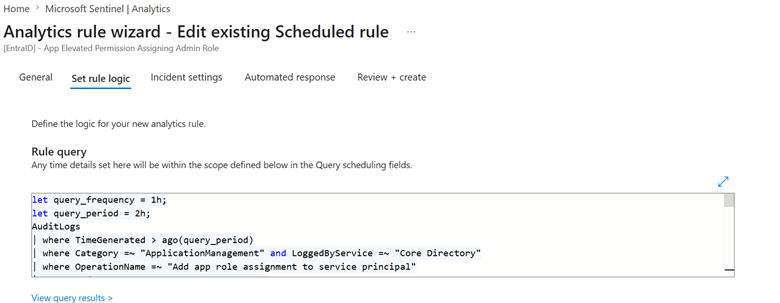
“`kql
// Detection time windows
// query_period: the permission may have been granted within the last 2 hours
// query_frequency: the role assignment using that permission must be within the last 1 hour
let query_frequency = 1h;
let query_period = 2h;
// ==========================================================
// EVENT 1 — Permission Grant: application receives the permission
// ==========================================================
AuditLogs
| where TimeGenerated > ago(query_period)
| where Category =~ “ApplicationManagement” and LoggedByService =~ “Core Directory”
// Operation that grants a permission (app role) to a service principal
| where OperationName =~ “Add app role assignment to service principal”
// Expands the TargetResources array and, inside it, the modifiedProperties array
// so each modified property of the event can be accessed individually
| mv-expand TargetResource = TargetResources
| mv-expand modifiedProperty = TargetResource[“modifiedProperties”]
// AppRole.Value is the field holding the name of the granted Graph permission
// (e.g. User.Read, Directory.Read.All, RoleManagement.ReadWrite.Directory)
| where tostring(modifiedProperty[“displayName”]) == “AppRole.Value”
| extend PermissionGrant = tostring(modifiedProperty[“newValue”])
// Keeps only events where the granted permission is the critical one
// (able to create/modify role assignments in the directory)
| where PermissionGrant has “RoleManagement.ReadWrite.Directory”
// Iterates over modifiedProperties again to build a bag (dictionary)
// with ALL properties of the event — this lets us extract AppDisplayName
// and AppServicePrincipalId in a single pass
| mv-apply modifiedProperty = TargetResource[“modifiedProperties”] on (
summarize modifiedProperties = make_bag(
bag_pack(tostring(modifiedProperty[“displayName”]),
bag_pack(“oldValue”, trim(@'[\”\s]+’, tostring(modifiedProperty[“oldValue”])),
“newValue”, trim(@'[\”\s]+’, tostring(modifiedProperty[“newValue”])))), 100)
)
// Projects the grant event fields with a “PermissionGrant_” prefix
// to avoid name collisions when we join with the second event
| project
PermissionGrant_TimeGenerated = TimeGenerated,
PermissionGrant_OperationName = OperationName,
PermissionGrant_Result = Result,
PermissionGrant,
AppDisplayName = tostring(modifiedProperties[“ServicePrincipal.DisplayName”][“newValue”]),
AppServicePrincipalId = tostring(modifiedProperties[“ServicePrincipal.ObjectID”][“newValue”]),
PermissionGrant_InitiatedBy = InitiatedBy,
PermissionGrant_TargetResources = TargetResources,
PermissionGrant_AdditionalDetails = AdditionalDetails,
PermissionGrant_CorrelationId = CorrelationId
// ==========================================================
// EVENT 2 — Role Assignment: same app assigns an admin role
// ==========================================================
| join kind=inner (
AuditLogs
| where TimeGenerated > ago(query_frequency)
// RoleManagement category and Assign operation type (role assignment)
| where Category =~ “RoleManagement” and LoggedByService =~ “Core Directory” and AADOperationType =~ “Assign”
// Keeps only events where the initiator is an APP (not a human user)
| where isnotempty(InitiatedBy[“app”])
| mv-expand TargetResource = TargetResources
| mv-expand modifiedProperty = TargetResource[“modifiedProperties”]
// displayName can show up as Role.DisplayName or RoleDefinitionDisplayName
// depending on the type of role assignment
| where tostring(modifiedProperty[“displayName”]) in (“Role.DisplayName”, “RoleDefinition.DisplayName”)
| extend RoleAssignment = tostring(modifiedProperty[“newValue”])
// Keeps roles whose name contains “Admin”
// (Global Administrator, Privileged Role Administrator, User Access Administrator, etc.)
| where RoleAssignment contains “Admin”
| project
RoleAssignment_TimeGenerated = TimeGenerated,
RoleAssignment_OperationName = OperationName,
RoleAssignment_Result = Result,
RoleAssignment,
TargetType = tostring(TargetResources[0][“type”]),
// Target may carry a UPN or a displayName depending on the principal type
Target = iff(isnotempty(TargetResources[0][“displayName”]), tostring(TargetResources[0][“displayName”]), tolower(TargetResources[0][“userPrincipalName”])),
TargetId = tostring(TargetResources[0][“id”]),
RoleAssignment_InitiatedBy = InitiatedBy,
RoleAssignment_TargetResources = TargetResources,
RoleAssignment_AdditionalDetails = AdditionalDetails,
RoleAssignment_CorrelationId = CorrelationId,
// ServicePrincipalId of the initiating app — join key with event 1
AppServicePrincipalId = tostring(InitiatedBy[“app”][“servicePrincipalId”])
) on AppServicePrincipalId
// Enforces the correct temporal order: permission granted BEFORE it is used
| where PermissionGrant_TimeGenerated < RoleAssignment_TimeGenerated
// Splits the target UPN into account name and domain suffix
// (useful for alert enrichment and future correlations)
| extend
TargetName = tostring(split(Target, “@”)[0]),
TargetUPNSuffix = tostring(split(Target, “@”)[1])
// Final reprojection with every field needed for investigation
| project PermissionGrant_TimeGenerated, PermissionGrant_OperationName, PermissionGrant_Result, PermissionGrant, AppDisplayName, AppServicePrincipalId, PermissionGrant_InitiatedBy, PermissionGrant_TargetResources, PermissionGrant_AdditionalDetails, PermissionGrant_CorrelationId, RoleAssignment_TimeGenerated, RoleAssignment_OperationName, RoleAssignment_Result, RoleAssignment, TargetType, Target, TargetName, TargetUPNSuffix, TargetId, RoleAssignment_InitiatedBy, RoleAssignment_TargetResources, RoleAssignment_AdditionalDetails, RoleAssignment_CorrelationId
// Enrichment of the event 1 initiator (whoever GRANTED the permission)
// Usually a human admin (legitimate or compromised) or an IAM app
| extend PermissionGrant_InitiatingUserPrincipalName = tostring(PermissionGrant_InitiatedBy.user.userPrincipalName)
| extend PermissionGrant_InitiatingAadUserId = tostring(PermissionGrant_InitiatedBy.user.id)
| extend PermissionGrant_InitiatingIpAddress = tostring(iff(isnotempty(PermissionGrant_InitiatedBy.user.ipAddress), PermissionGrant_InitiatedBy.user.ipAddress, PermissionGrant_InitiatedBy.app.ipAddress))
| extend PermissionGrant_InitiatingAccountName = tostring(split(PermissionGrant_InitiatingUserPrincipalName, “@”)[0]), PermissionGrant_InitiatingAccountUPNSuffix = tostring(split(PermissionGrant_InitiatingUserPrincipalName, “@”)[1])
// Enrichment of the event 2 initiator (the app that USED the permission)
// Usually empty in user.* because the initiator is the app, not a human
| extend RoleAssignment_InitiatingUserPrincipalName = tostring(RoleAssignment_InitiatedBy.user.userPrincipalName)
| extend RoleAssignment_InitiatingAadUserId = tostring(RoleAssignment_InitiatedBy.user.id)
| extend RoleAssignment_InitiatingIpAddress = tostring(iff(isnotempty(RoleAssignment_InitiatedBy.user.ipAddress), RoleAssignment_InitiatedBy.user.ipAddress, RoleAssignment_InitiatedBy.app.ipAddress))
| extend RoleAssignment_InitiatingAccountName = tostring(split(RoleAssignment_InitiatingUserPrincipalName, “@”)[0]), RoleAssignment_InitiatingAccountUPNSuffix = tostring(split(RoleAssignment_InitiatingUserPrincipalName, “@”)[1])
“`
Important notes on the logic:
– **`query_period = 2h` vs `query_frequency = 1h`**: the windows are deliberately different. The permission may have been granted at the start of the last 2 hours, and the attacker may have waited before using it. Keeping the grant window wider captures scenarios where there is a small delay between the two events.
– **`make_bag` for modifiedProperties**: the modifiedProperties array has multiple entries (one per modified property). `make_bag` consolidates that into a single object where each property can be accessed by name, avoiding multiple nested `mv-expand` calls.
– **`contains “Admin”`**: catches variations such as Global Administrator, Privileged Role Administrator, User Access Administrator, Application Administrator, Cloud Application Administrator, Helpdesk Administrator, and so on. Careful: it also catches legitimate roles like “Office Apps Admin” — worth tuning for production by excluding low-impact roles if it generates too much noise.
– **Temporal order enforced**: the `where PermissionGrant_TimeGenerated < RoleAssignment_TimeGenerated` guarantees we’re detecting the right chain (cause → effect) and not isolated events that happen to coincide in time.
Configuring the alert
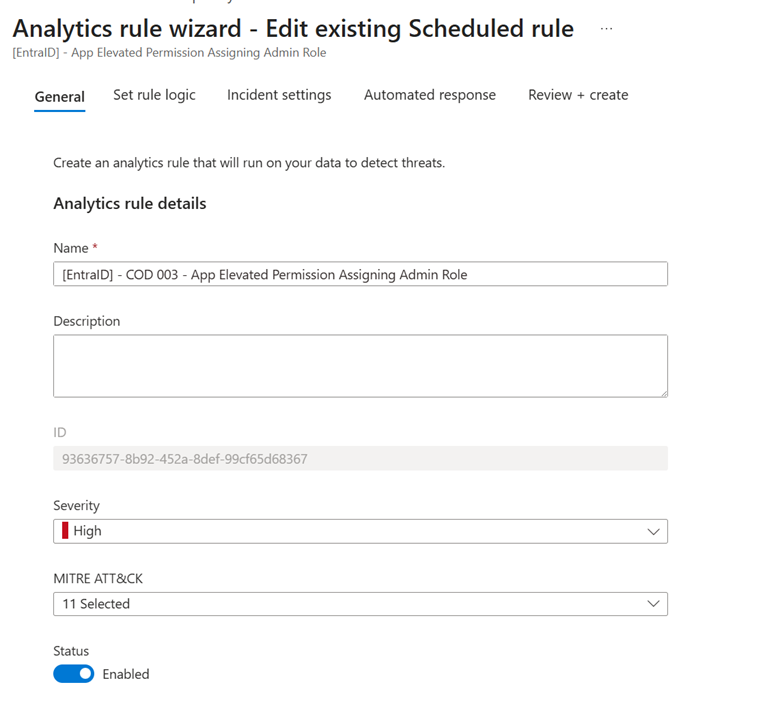
In Sentinel, go to **Analytics > Create > Create a new Scheduled rule**.
Give it the name and description that best fit your environment, and map the following MITRE techniques:
- Persistence
- Account Manipulation: Additional Cloud Roles
- Account Manipulation: Additional Cloud Credentials
- Privilege Escalation
- Valid Accounts: Cloud Accounts
- Domain or Tenant Policy Modification: Trust Modification
- Defense Evasion
In **Set rule logic**, configure the query explained above (remove all the blank lines and the comments — Sentinel is quite picky about that).
In **Entity mapping**, configure:
| Entity Type | Identifier | Mapped Field |
| Account | FullName | RoleAssignment_InitiatingUserPrincipalName |
| Account | Name | RoleAssignment_InitiatingAccountName |
| Account | UPNSuffix | RoleAssignment_InitiatingAccountUPNSuffix |
| Account | AadUserId | RoleAssignment_InitiatingAadUserId |
| IP | Address | RoleAssignment_InitiatingIpAddress |
| AzureResource | ResourceId | AppServicePrincipalId |
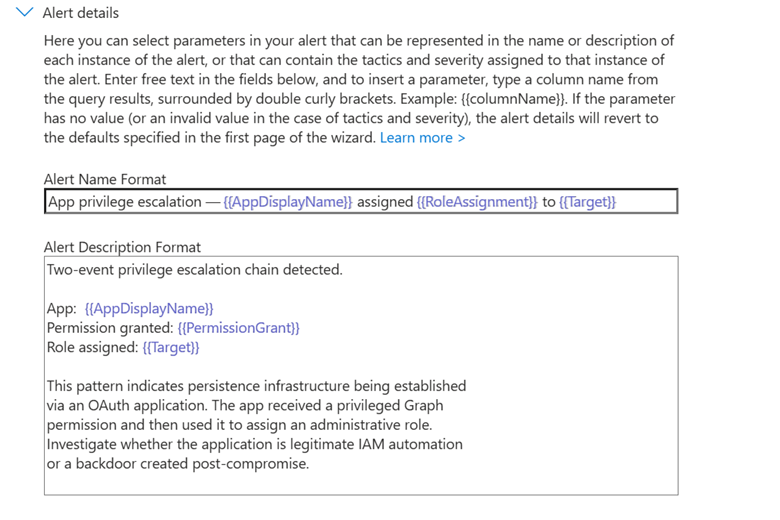
In **Custom details**, configure:
| Key (name shown in the alert) | Value (query column) |
| AppDisplayName | AppDisplayName |
| AppSerPrincipalId | AppServicePrincipalId |
| PermissionGrant | PermissionGrant |
| RoleAssignment | RoleAssignment |
| Target | Target |
| TargetType | TargetType |
| PermissionGrant_Time | PermissionGrant_TimeGenerated |
| RoleAssignment_Time | RoleAssignment_TimeGenerated |
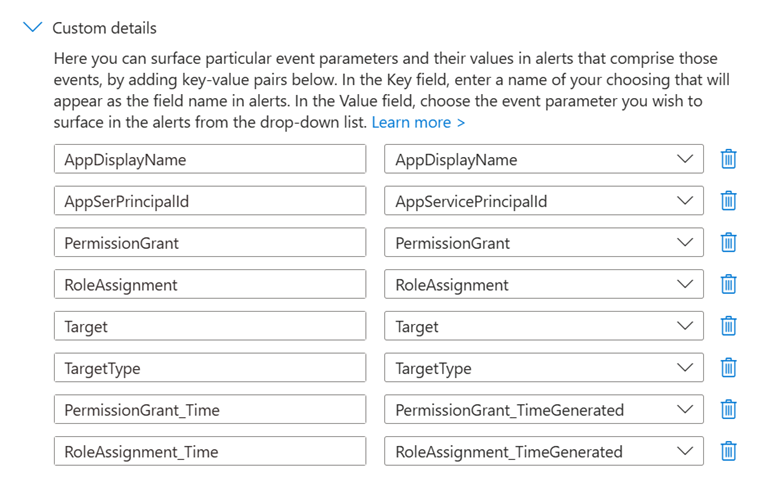
In **Alert details**, configure something like:
**Alert Name Format**
“`
App privilege escalation — {{AppDisplayName}} assigned {{RoleAssignment}} to {{Target}}
“`
**Alert Description Format**
“`
Two-event privilege escalation chain detected.
App: {{AppDisplayName}}
Permission granted: {{PermissionGrant}}
Role assigned: {{Target}}
This pattern indicates persistence infrastructure being established
via an OAuth application. The app received a privileged Graph
permission and then used it to assign an administrative role.
Investigate whether the application is legitimate IAM automation
or a backdoor created post-compromise.“`
Set the query to run every **10 minutes** and look back over the last **2 hours** (aligned with `query_period`).
In **Alert threshold**, keep **Is greater than 0** and configure it to generate an alert for each event.
Finally, in the **Incident settings** tab, configure the alert to create an incident.
Testing the alert
To test this alert I created an app and granted it the permissions:
Then I ran the following script via PowerShell
# ============================================================
# Test: Global Admin assignment through an OAuth app
# ============================================================
$TenantId = “Your Tenant ID”
$ClientId = “Your Client ID”
$ClientSecret = “Your Client Secret”
$TargetUserUPN = “target_user@yourdomain.com”
# Connect to Graph
$body = @{
grant_type = “client_credentials”
client_id = $ClientId
client_secret = $ClientSecret
scope = “https://graph.microsoft.com/.default”
}
$token = Invoke-RestMethod `
-Method POST `
-Uri “https://login.microsoftonline.com/$TenantId/oauth2/v2.0/token” `
-Body $body
$token.access_token
Connect-MgGraph -AccessToken ($token.access_token | ConvertTo-SecureString -AsPlainText -Force)
# Look up the target user
$TargetUser = Get-MgUser -Filter “userPrincipalName eq ‘$TargetUserUPN'”
# Look up the Global Admin role definition
$GlobalAdminRole = Get-MgRoleManagementDirectoryRoleDefinition `
-Filter “templateId eq ’62e90394-69f5-4237-9190-012177145e10′”
# Create the role assignment
$params = @{
“@odata.type” = “#microsoft.graph.unifiedRoleAssignment”
roleDefinitionId = $GlobalAdminRole.Id
principalId = $TargetUser.Id
directoryScopeId = “/”
}
$assignment = New-MgRoleManagementDirectoryRoleAssignment `
-BodyParameter $params
Write-Host “Global Admin assigned:”
Write-Host “Assignment ID: $($assignment.Id)”
And the alert was generated:
Anatomy of the alert
The alert returns enough information for initial triage without immediately needing to pivot manually across multiple tables. The main fields returned are:
– **AppDisplayName** — name of the application that received the permission and performed the assignment
– **AppServicePrincipalId** — the app’s service principal ID (the join key between the two events)
– **PermissionGrant** — the critical permission granted (`RoleManagement.ReadWrite.Directory`)
– **RoleAssignment** — the administrative role that was assigned
– **Target** — user or principal that received the administrative role
– **TargetType** — type of the affected principal (User, Group, ServicePrincipal)
– **PermissionGrant_TimeGenerated** and **RoleAssignment_TimeGenerated** — timestamps of both events
– **PermissionGrant_InitiatingUserPrincipalName** and **PermissionGrant_InitiatingIpAddress** — who (human or app) originally granted the permission, and from which IP
`PermissionGrant_InitiatingUserPrincipalName` is the most important field for initial triage. If the initiator is a legitimate administrative human, it’s worth investigating:
– Does the admin recognize creating the app?
– Is there a business justification?
– Was the app documented through any governance process?
If the initiator is another app (typical in IAM automation), it’s worth validating:
– Is the IAM app known and authorized?
– Does the operation match a legitimate provisioning workflow?
The time window between `PermissionGrant_TimeGenerated` and `RoleAssignment_TimeGenerated` also matters operationally. Real attacks frequently show gaps of seconds to a few minutes — the attacker uses the permission immediately. Legitimate IAM workflows usually have larger gaps (minutes to hours) because they involve approval, scheduled synchronization, or batch processes.
`AppDisplayName` deserves special attention. Malicious apps frequently use generic names that blend into legitimate infrastructure (“Internal Connector”, “Service Account”, “API Gateway”, “Microsoft Service”), trying to slip past superficial log reviews.
Where the detection fails
Useful as it is, this detection has important limitations worth documenting:
Legitimate IAM applications (Okta, SailPoint, Saviynt, in-house provisioning solutions) produce exactly this pattern as part of normal operation. In environments with mature identity automation, the rule can generate **false positives at high frequency**. The mitigation is to maintain an allowlist of service principals authorized to perform this chain of operations, excluding them from the rule or routing them to Low severity.
The 2-hour time window is deliberately tight to reduce false positives. Sophisticated attackers who know about this detection can **split the events**: grant the permission at one moment and use it days later. The rule doesn’t catch that pattern. Partial mitigation: create a companion rule that monitors **use of `RoleManagement.ReadWrite.Directory`** regardless of how long ago it was granted, although this significantly increases noise.
The detection focuses only on `RoleManagement.ReadWrite.Directory` as the trigger permission. Other equally dangerous Graph permissions are not covered:
– `RoleManagement.ReadWrite.All` (some scenarios)
– `Directory.ReadWrite.All` (can assign roles in some contexts)
– `Application.ReadWrite.All` (allows creating apps and granting permissions to them)
– `AppRoleAssignment.ReadWrite.All`
For full coverage you need to create variations of the rule for each critical permission — keeping the temporal join structure but changing the initial filter.
The rule also depends on both events reaching the Entra ID AuditLogs. Operations performed through the Graph API with evasion techniques (token replay, delegated permission abuse, logging race conditions) may produce events with timestamps or InitiatedBy fields different from what’s expected.
Finally, the detection monitors the **persistence establishment** phase, but it doesn’t prevent the initial compromise nor detect continued use of the back door. By the time the alert fires, persistence infrastructure already exists — the response has to be fast to limit the blast radius. Preventive controls remain fundamental:
– Restricting who can consent to privileged Graph permissions
– Mandatory app registration approval workflow
– Privileged Identity Management for administrative roles (ideally all of them)
– Conditional Access policies applied to apps with sensitive Graph permissions
– Periodic review of apps holding high-privilege permissions
Framework mapping
The detection aligns primarily with MITRE ATT&CK in the following techniques:
– TA0003 — Persistence
– T1098.003 — Account Manipulation: Additional Cloud Roles
– T1098.001 — Account Manipulation: Additional Cloud Credentials
– TA0004 — Privilege Escalation
– T1078.004 — Valid Accounts: Cloud Accounts
– T1484.002 — Domain or Tenant Policy Modification: Trust Modification
– TA0005 — Defense Evasion (partial — applications bypass several user-focused detections)
The observed behavior normally appears after the initial compromise of an administrative identity. The attacker uses the newly obtained legitimate administrative access to establish a parallel persistence vector (the OAuth application), one that is more resistant to traditional IR controls such as password reset and MFA enforcement.
Within NIST CSF 2.0, the use case fits mainly into the functions:
– Detect (DE)
– Respond (RS)
Especially in:
– DE.CM — Security Continuous Monitoring
– DE.AE — Adverse Event Analysis
– RS.AN — Incident Analysis
– RS.MI — Mitigation
This detection also ties directly into Zero Trust and Identity-Centric Security architectures, particularly in the principles of:
– **Verify explicitly** — apps should be verified and authorized as first-class identities, not treated as passive infrastructure
– **Least privilege access** — elevated Graph permissions should be granted with minimal scope and reviewed periodically
– **Assume breach** — starting from the premise that admins can be compromised, you have to monitor what those admins do in privileged sessions, especially the creation of apps with sensitive permissions
Incident response plan
Preparation
Goal
Ensure the organization has adequate controls, processes and tooling to prevent and respond to this kind of incident.
Actions taken (or that should already be in place):
Successful response depends on preparation done before the incident. Even before the alert fires, it’s essential that the organization has:
- An up-to-date inventory of apps holding privileged Graph permissions, with an identified owner and business justification
- A mandatory approval workflow for registering new apps in the tenant (through Conditional Access or administrative policies)
- An allowlist of legitimate IAM apps that perform the detected chain pattern, to reduce false positives
- Pre-validated access to Microsoft Graph PowerShell and Graph Explorer with break-glass accounts, for fast response outside the normal flow
- Clear permission definitions and SOC team segmentation, so the team can act on the directory quickly
Detection and analysis
Goal
Confirm the incident, understand the scope, and assess the impact.
Actions to validate:
Once the alert fires, the analyst should immediately assess the legitimacy of the event chain:
- Validate whether the application involved is known and authorized. Check the app inventory, consult the registered owner, and verify whether there is a change ticket related to the creation or modification of permissions.
- Analyze who granted the permission (the `PermissionGrant_InitiatingUserPrincipalName` field). If it was a human admin, validate whether they recognize the action. If it was another app, validate whether the originating app is legitimate.
- Analyze the time gap between `PermissionGrant_TimeGenerated` and `RoleAssignment_TimeGenerated`. Very short gaps (seconds to a few minutes) and activity outside business hours suggest an automated attack. Longer gaps with a pause between the actions suggest a legitimate IAM workflow.
- Check the source IP of the PermissionGrant. Connections from non-corporate IPs, atypical geolocations, or TOR/VPN exits raise suspicion.
- Assess the target of the role assignment. A recently created account? An account with atypical naming? An account that didn’t exist 24 hours ago? Those are strong back-door indicators.
- Correlate with other events from the same initiator in the last 24–72 hours: creation of other apps, OAuth consent, Conditional Access changes, modifications to administrative policies.
If the chain can’t be validated as legitimate within a few minutes, assume compromise and move to containment.
Containment
Goal
Contain the impact, stop continued use of the back door, and reverse the administrative effects of the attack.
Actions:
If there is reasonable evidence of compromise:
- Immediately revoke all privileged permissions from the application (`Remove-MgServicePrincipalAppRoleAssignment` via Graph PowerShell)
- Disable the service principal (`Disable-MgServicePrincipal` or `accountEnabled = false`)
- Remove the administrative role assigned to the target (`Remove-MgDirectoryRoleMember` or through the portal)
- Review and remove any credential (client secret, certificate) associated with the app
- Revoke all active tokens related to the app via `Revoke-AzureADUserAllRefreshToken` or Graph
- Block the source IP in Conditional Access rules or the firewall, if it is external and suspicious
- Disable the target account that received the administrative role (until legitimacy is validated)
Containment needs to be fast and comprehensive, because the attacker may be **actively using** the back door while the investigation is happening. In parallel:
- Hunt for other apps created by the same initiator in the last 72 hours
- Hunt for other accounts that received administrative roles through an app in the same period
- Validate changes to Conditional Access, MFA policies, or federated authentication
Eradication
Goal
Completely remove the attacker’s ability to persist in the environment.
Actions:
After immediate containment, secondary vectors have to be eliminated:
A full audit of ALL apps holding privileged Graph permissions in the tenant — not just the compromised app
- Review of all recent admin consents, especially those granted by the same admin who granted the critical permission
- Analysis of applications created in the last 30 days with any Directory or RoleManagement permission
- Validation of Conditional Access changes, especially policy exclusions that would normally protect administrative accounts
- Verification of new devices registered in the tenant by the compromised admin account
- Credential reset (password, MFA, refresh tokens) for the administrative accounts involved
- Rotation of secrets/certificates for service principals the attacker may have accessed through Graph
If there is any sign that the app had time to establish additional persistence (creation of other admin accounts, federation trust modification, changes to outbound spam policies), expand the eradication scope to cover those vectors.
Post-incident lessons learned
Goal
Learn from the incident, improve processes, and strengthen the preventive posture.
Actions:
Document the full attack timeline, including every relevant timestamp (initial compromise → app creation → permission grant → permission use → detection → containment)
Record all observed IOCs: AppServicePrincipalIds, IPs, user agents, temporal patterns
Refine the detection rule based on what was observed: thresholds, allowlists of legitimate apps, integration with other telemetry sources
Review application governance policies:
- Who can create app registrations
- Who can grant admin consent to Graph permissions
- Which Graph permissions require extra approval
- App lifecycle management (periodic review, permission expiration).
Implement or reinforce PIM/JIT for administrative roles — including Privileged Role Administrator
Consider Conditional Access policies applied to apps with critical permissions
Update administrator training on this attack vector
Share lessons learned with identity governance, security architecture and IT leadership
Next steps
The detection described here shortens the time between the back door being established through an app and the SOC’s response. But the structural problem is **how applications are created, authorized and governed** in the tenant.
The natural path to reducing the surface:
- Reduce the number of admins who can grant admin consent to privileged Graph permissions
- Require verified publishers as a prerequisite for apps with sensitive permissions
- Adopt Microsoft Graph workload identity federation for internal apps, reducing the need for client secrets
- Establish a formal periodic review of apps with privileged permissions (quarterly at minimum)
- Implement continuous monitoring of permission changes on existing apps, not just on new ones
- Consider Defender for Cloud Apps for continuous inventory and governance of OAuth apps
- Evaluate adopting Conditional Access for Workload Identities (preview) to extend CA to service principals
It’s also worth expanding detection coverage to correlated events:
- Creation of apps with sensitive permissions outside business hours
- Admin consent granted outside the expected approval window
- Conditional Access modifications made by apps (not users)
- Federation trust changes made by apps
- Creation of new service principals with atypical naming
The end goal isn’t just to detect the specific `permission grant → role assignment` chain. It’s to raise the level of application identity governance so that apps are treated as **first-class privileged identities**, subject to the same controls, monitoring and review as human administrative accounts.